1506TV 4M SGF1 MENU BUILT-IN WIFI NEW SOFTWARE

0
 NewBox 1506TV SGF1 V12.01.13. New Update Built-In WIFI Software

Updated Software With New Receiver Option:
New Box 1506TV 4M SGF1, 1506FV, 1506HV 4M Digital Receiver Update With New Look SGF1 Menu. About STB Hardware Version DVBS-1506TV-V1.0-OTP-S0. Network Applications Youtube working Fine in this New Receiver software. Everything About Satellite TV Receiver Like our Facebook Page. How To Fix No Match File Error Click Here Default Customer ID is 13 52 FF 71 05 00.

1506TV 4M NEW SOFTWARE INFORMATION
Hardware Version  — DVBS-1506TV-V1.0-OTP-S0
Software Version  — SGF1 V12.01.13-2
Software Date  —  14-02-2022
File Name  —  1506TV 512 4M SGF1_ internel_wifi 20220214 144533.bin
Download Link Blow Post Conent

Information
Upgrade Option USB, http, RS232
Menu SGF1
Network WIFI External, Internal
S Dqcam, Nashare, Nashare Pro
IPTV Xtream IPTV, Zuma IPTV, Aspis IPTV, Quraan IPTV
ECAST Available
Key Option Go to channel list and press “0”
Online Video Yes
Patch Code 1506
Full Reveiew Watch This Video

1506TV 4M SGF1 MENU BUILT-IN WIFI NEW SOFTWARE

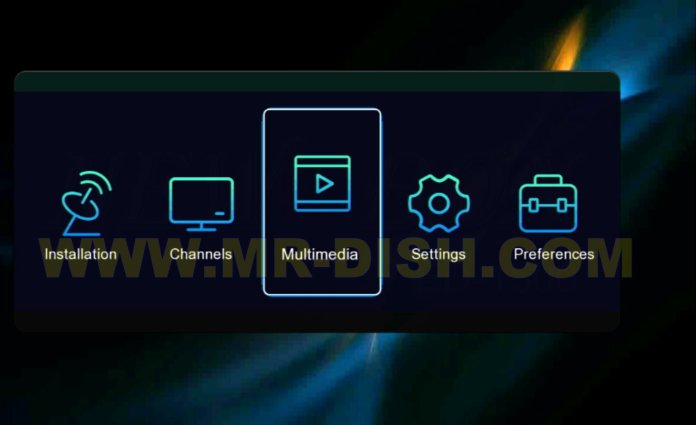
1506TV 4M SGF1 MENU

Multimedia Option:

How to Enable Menu in Leo_1506TV 4M Receiver?
Go to Multimedia and Insert Code “1506

Important Note: After Hardware Version 4 word like  SOA2, SCB1, SGB1 etc are Menu Version. You Check Only Hardware Version Like 1506T, 1506TV, 1506LV etc. And Update Receiver with Same Hardware Version.

No Match Error?

Click Here

How to Multimedia Receiver?

1506TV 1506FV ALL SOFTWARE.

Download NewBox 1506TV, 1506FV, 1506HV 512 4M Receiver with Built-In WIFI, SGF1 Menu New Software.

TRUMAN TM-X1 1506HV 4M RECEIVER NEW SOFTWARE

TRUMAN TM-X1 1506HV 512 4M DIGITAL SATELLITE RECEIVER NEW SVC4 SOFTWARE UPDATE WITH KTV PLUS AND TIKTOK

Updated Software With New Receiver Option:
TRUMAN TM-X1 1506HV , 1506FV, 1506TV 4M Digital Receiver Update With New Look SVC4 Menu. About STB Hardware Version DVBS-1506HV-V1.0-OTP-S0. Network Applications Youtube working Fine in this New Receiver software. Everything About Satellite TV Receiver Like our Facebook Page. How To Fix No Match File Error Click Here Default Customer ID is 13 52 FF 71 05 00.

TRUMAN TM-X1 1506HV 4M RECEIVER NEW SOFTWARE

TRUMAN TM-X1_ 1506HV 4M NEW SOFTWARE INFORMATION
Hardware Version  — DVBS-1506HV-V1.0-OTP-S0
Software Version  — SVC4 V11.09.22-2
Software Date  —  23-10-2021
File Name  —  TRUMAN TM-X1 1506HV_ SVC4 V11.09.22.bin
Download Link Blow Post Conent

Information
Upgrade Option USB, http, RS232
Menu SVB3
Network USB CABLE INTERNET, WIRE NETWORK, WIFI NETWORK WIFI_ RT5370
Server Dqcam
IPTV Xtream IPTV, QURAA IPTV, E-Vision IPTV, KTV PLUS
ECAST Available
Key Option Go to channel list and press “0”
Online Video Kooora, TED, Aljazeera, Dailymotion, Live Stream, Awaz, Youtube, Twitch, Facebook Live, TikTok, Youtube Kids
Patch Code 1506
Full Reveiew Watch This Video

Connect Sunplus 1506HV Satellite TV Receiver with the Internet Option.
there are 3 Opition like USB CABLE INTERNET, WIRE NETWORK, WIFI NETWORK . WIFI Supported Devic is “5370”. WIFI Supported Devic is “RT5370.

TRUMAN TM-X1 1506HV NEW SVB3 IPTV Receiver Option: Xtream IPTV, QURAA IPTV, E-Vision IPTV, KTV PLUS

TRUMAN TM-X1 1506HV 4M IPTV SOFTWARE

How to Enable Patch Menu in Leo_1506HV 4M Receiver?
Go to Multimedia and Insert Code “1506” TRUMAN TM-X1_ 1506HV 4M SVC4 Receiver Server Option: Dqcam

TRUMAN TM-X1 1506HV Online Video Apps:  TED, Aljazeera, Dailymotion, Live Stream, Awaz, Youtube, Twitch, Facebook Live, TikTok, Youtube Kids

TRUMAN TM-X1 1506HV 4M Online Video

Satellite Key: TRUMAN TM-X1_How to Add Direct Satellite Key on Channel?
Go to Channel list and press 0 from Remote Control.

ECAST: Add New Option In Sunplus 1506HV, 1506TV, 1506FV 4m Receiver Option (Event-Condition-Action Spatial-Scope Temporal-Scope)
Avilible, What is Ecast and How it Work Visit Here? Sunplus 1506TV Receiver Option

Important Note: After Hardware Version 4 word like  SOA2, SCB1, SGB1 etc are Menu Version. You Check Only Hardware Version Like 1506T, 1506TV, 1506LV etc. And Update Receiver with Same Hardware Version.

1506HV Receiver Software And Fix No Match Error?

Click Here

Software Update with USB only in 1506T DQCam Server Option Receiver. If Your Receiver Server Option is DSCam then Upgrade Receicer with Sunplus Loader.

How to Multimedia Receiver?

1506HV 1506TV 1506FV ALL SOFTWARE.
IMEI Changer Software 1506TV.
Use Ecast.
How to Update with RS232 Cable.
Fix No Match File Error.
FTP Upgrade.
Add Direct Satellite Key.

Download TRUMAN TM-X1 1506HV, 1506FV, 1506TV 512 4M Receiver with KTV PLUS AND TIKTOK, SVC4 Menu New Software 2022.

SUNPLUS 1506T DVB FINDER SVA8 NEW SOFTWARE

SUNPLUS 1506T 1506F 4M SATELLITE RECEIVER NEW SVA8 MENU SOFTWARE WITH DVB FINDER

Updated Software With New Receiver Option:
SUNPLUS 1506T DVB FINDER Software Update With New Look SVA8 Menu. About STB Hardware Version dvbs-1506t-V1.0-OTP. Software Version SVA8 V11.10.25-2. Network Applications Youtube working Fine in this New Receiver software. Everything About Satellite TV Receiver Like our Facebook Page.

SUNPLUS 1506T DVB FINDER SVA8 NEW SOFTWARE

If No Match File error During Update Receiver  Click Here to Slove Issu. Default Customer ID is EF 52 1F 3E 02 00

Multimedia 1506T and 1506F Satellite Receiver DVB Finfer Receiver Option

SUNPLUS 1506T DVB FINDER Option

SUNPLUS 1506T 1506F 4M NEW SOFTWARE INFORMATION
Hardware Version  — dvbs-1506t-V1.0-OTP
Software Version  — SVA8 V11.10.25-2
Software Date  —  26-11-2021
File Name  —  1506T 1506F SVA8 4M with Dvb Finder 30-112021_.bin
Download Link Blow Post Conent

Information
Upgrade Option USB, http, RS232
Menu SVA8
Network USB CABLE INTERNET, WIFI NETWORK and WIRE NETWORK       WIFI_ 5370
Server Xcam Setup
IPTV Free IPTV, Xtream IPTV, QURAAN IPTV, Dolphin IPTV, N+ V2 IPTV, Balance IPTV, Action IPTV
ECAST Available
Key Option Go to channel list and press “0”
Online Video Youtube, 
Patch Code 1506
Full Reveiew Watch This Video

SUNPLUS 1506T DVB FINDER Version

Connect Sunplus 1506T Satellite TV Receiver with the Internet Option.
there are 3 Opition like USB CABLE INTERNET, WIFI NETWORK and WIRE NETWORK . WIFI Supported Devic is “5370”. WIFI Supported Devic is “5370.

Sunplus 1506T, 1506F 4M Receiver IPTV Option: Free IPTV, Xtream IPTV, QURAAN IPTV, Dolphin IPTV, N+ V2 IPTV, Balance IPTV, Action IPTV

How to Enable Patch Menu in 1506T_1506F 4M Receiver?
Go to Multimedia and Insert Code “1506“.  Server Option: Xcam Setup

Satellite Key: 1506T/F_How to Add Direct Satellite Key on Channel?
Go to Channel list and press 0 from Remote Control.

ECAST: Add New Option In Sunplus 1506T, 1506F 4m Receiver Option (Event-Condition-Action Spatial-Scope Temporal-Scope)
Avilible, What is Ecast and How it Work Visit Here? Sunplus 1506TV Receiver Option

Important Note: After Hardware Version 4 word like  SOA2, SCB1, SGB1 etc are Menu Version. You Check Only Hardware Version Like 1506T, 1506TV, 1506LV etc. And Update Receiver with Same Hardware Version.

How to 1506T 1506F Receiver Fix No Match Error?

From PC
From Mobile

Software Update with USB only in 1506T DQCam Server Option Receiver. If Your Receiver Server Option is DSCam then Upgrade Receicer with Sunplus Loader.

How to Multimedia Receiver?

1506T ALL SOFTWARE.
IMEI Changer Software 1506T.
Use Ecast.
How to Update with RS232 Cable.
Fix No Match File Error.
FTP Upgrade.
Add Direct Satellite Key.

Download Multimedia SUNPLUS 1506T DVB FINDER SVA8 Menu Receiver New Software.

HK-T.RT2959P90 LED TV FIRMWARE

0

HK-T.RT2959P90 SOFTWARE DOWNLOAD

Download led firmware free for HK-T.RT2959P90 board with the latest update. Here you download led software for all models and sizes. Android Apps, Light Flow, NotifyBuddy, player, and others Led Download. If you can’t find your desired software, please get in touch with us on Twitter or Facebook page.

Description :

Today, we are delighted to present to you the complete collection of HK-T.RT2959P90 Firmware Resolutions, completely free of charge. This remarkable assortment of USB Firmware/Software is both invaluable and up-to-date.

In response to numerous requests from our esteemed visitors, we have taken the initiative to upload and share the latest compilation of HK-T.RT2959P90 Software/Firmware at no cost. As you may already know, a Universal Board can be effortlessly utilized in any display panel or TV model, provided you possess the appropriate Firmware resolution tailored to your specific board. This includes considerations such as display panel compatibility, remote control support, and language options.

If you happen to discover the HK-T.RT2959P90 software that fulfills your requirements, you are in luck. Obtaining it is now a breeze – simply click the download button corresponding to the firmware software file of your choice (every file is accompanied by a download button in this post). Upon clicking, the file will be swiftly downloaded, and you can find the saved file in the Downloads folder of your PC or Smart Phone.

HK-T.RT2959P90 LED TV FIRMWARE

HK-T.RT2959P90 Specifications:

Model: HK-T.RT2959P90
Main Chipset: RTD295
Supported Resolution: 1920×1080
CPU: Not specified
Operating System: Non-Smart
RAM: Not applicable
ROM: 25Q64 SPI Memory (8 MBit)
Audio Output Power: 2X8 W (8Ω)
Backlight: 43-52V
Backlight Power: 680mA
Service Code: Source 2580
Mirror Mode: Not available
Multi-Language: Yes
Firmware File: Install.img
Compatible with Product Brands: DAEWOO, etc
Firmware Type: USB upgradable Firmware

Please take note: The provided Software is a backup Dump, intended to be written using a programming tool. Mr Dish Team holds no liability for any damage or loss incurred during the uploading or downloading of the firmware. It is essential to verify the compatibility of your mainboard before proceeding with the software installation. If you are unfamiliar with the process of loading or installing software/firmware or dump files, we strongly recommend reading the accompanying instructions beforehand to ensure a successful experience.

How to Update Led software with USB?

Download Software for HK-T.RT2959P90 LED TV

JOKER ORANGE 1506T 4M RECEIVER SGR1 SOFTWARE

JOKER ORANGE 1506T 1506F 4M SATELLITE RECEIVER NEW SGR1 MENU SOFTWARE

Updated Software With New Receiver Option:
JOKER ORANGE 1506T 4m Receiver Software Update With SGR1 Menu. About STB Hardware Version dvbs-1506t-V1.0-OTP. Software Version SGR1 V12.05.16-2. Network Applications Youtube working Fine in this New Receiver software. Everything About Satellite TV Receiver Like our Facebook Page.

JOKER ORANGE 1506T 4M RECEIVER SGR1 SOFTWARE

If No Match File error During Update Receiver  Click Here to Slove Issu. Default Customer ID is EF 52 1F 3E 02 00

About STB :

Brand : JOKER ORANGE1506T 1506F 4M NEW SOFTWARE INFORMATION
Hardware Version  : dvbs-1506t-V1.0-OTP
Software Version  : SGR1 V12.05.16-2
Software Date  : 17-06-2022
File Name : JOKER ORANGE 1506T 512 4M SGR1 V12.05.16 17-6-2022.bin
Download Link Blow Post Conent

JOKER ORANGE 1506T 4M RECEIVER SGR1 V12.05.16-2

Software Requirements Specification :

Brand: JOKER ORANGE
Hardware: Sunplus dvbs-1506t-V1.0-OTP
Flash Size: 4MB
Software Version: V12.05.16-2
Software Date: 17 JUNE 2022
Menu Version: SGR1
How to Update New Software?
Update Software with USB, RS232 Cable and HTTP Upgrade (online Upgrade)
LNB: Cbnad and KU Band
Satellites: 61 Satellite Added
DiSEqC Mode: 1.0 and 1.1
22KHz
Scan Mode: Auto Scan, Blind Scan and manual Sacan
OSD Languages: English, Frinch and Arbic
Ethernet Config: WIFI Network, 3G Network and USB Cable internet
Wifi Stik: 5370
Ecast Option. Yes

Multi media Option:

(Code 1506) Youtube, Kooora, Online Video, IPTV, Patch, 
Option: 5 Add at a Time
S: NDQCAM, ORANGE SHARE, ORANGE SHARE PLUS
Online Video Apps:
Youtube, TED, Aljazeera, Dailymotiion, Livestream, Awaz, Twitch, Facebook Live, TikTok, Youtube Kids.
IPTV Option:
Quran Iptv , Xtream Iptv ,E-Vision Iptv, E-Vision VOD , Orange Plus Live
Satellite Key: Biss Key, Irdeto Key, Cryptoworks, Nagravision, Viaccess Key, PowerVU Key, TandBerg Key.
Go to Channel and press “0” for Add or Edit Key

Software Screen Shoots

Important Note: After Hardware Version 4 word like  SOA2, SCB1, SGB1 etc are Menu Version. You Check Only Hardware Version Like 1506T, 1506TV, 1506LV etc. And Update Receiver with Same Hardware Version.

No Match Error?

From PC
From Mobile

Software Update with USB only in 1506T DQCam Server Option Receiver. If Your Receiver Server Option is DSCam then Upgrade Receicer with Sunplus Loader.

How to Multimedia Receiver?

1506T ALL SOFTWARE.

Download JOKER ORANGE 1506T 4M Receiver SGR1 New Software V12.05.16.2

SHARP STAR H5 1506TV 4M RECEIVER NEW SOFTWARE

SHARP STAR H5 1506TV STB2 V12.03.28-2 New Software

Updated Software With New Receiver Option: SHARP STAR H5 1506TV 4M STB2, 1506FV, 1506HV 4M Digital Receiver Update With New Look STB2 Menu. About STB Hardware Version DVBS-1506TV-V1.0-OTP-S0. Network Applications Youtube working Fine in this New Receiver software. Everything About Satellite TV Receiver Like our Facebook Page. How To Fix No Match File Error Click Here Default Customer ID is 13 52 FF 71 05 00.

SHARP STAR H5 1506TV 4M RECEIVER NEW SOFTWARE

1506TV 4M NEW SOFTWARE INFORMATION Hardware Version  — DVBS-1506TV-V1.0-OTP-S0 Software Version  — SGF1 V12.03.28-2 Software Date  —  29-04-2022 File Name  —  Sharp Star H5 1506TV 512 4M STB2 20220429.bin Download Link Blow Post Conent

SHARP STAR H5 1506TV 4M RECEIVER NEW SOFTWARE Version

Software Requirements Specification :
Brand: Sharp Star Hardware: Sunplus DVBS-1506TV-V1.0-OTP-S0 Flash Size: 4MB Software Version: V12.03.28-2 Software Date: 29 Apr 2022 Menu Version: STB2 How to Update New Software? Update Software with USB, RS232 Cable and HTTP Upgrade (online Upgrade) LNB: Cbnad and KU Band Satellites: 61 Satellite Added DiSEqC Mode: 1.0 and 1.1 22KHz Scan Mode: Auto Scan, Blind Scan and manual Sacan OSD Languages: English, Frinch and Arbic Ethernet Config: WIFI Network and USB Cable internet Wifi Stik: 5370 Ecast Option.
Multi media Option:
(Code 1506) Youtube, Kooora, Online Video, IPTV, Patch, Sharing Option: 5 Server Add at a Time Sarver Option: NAShare, NASahre Pro, DQCam, Fire SHare, Express Pro Online Video Apps: Youtube, TED, Aljazeera, Dailymotiion, Livestream, Awaz, Twitch, Facebook Live, TikTok, Youtube Kids. IPTV Option: Jaguar IPTV: Jaguar Movies, Jaguar Series, Jaguar Mix, Jaguar Netflex, Kids, Jaguar Rdio, Jaguar Quran Xtream IPTV Best IPTV, Best Vod Sharp IPTV: Sharp VOD, Sharp Series, Sharp Music, Sharp Radio, Sharp Quraan, Sharp Kid, Sharp Video. Oscar IPTV: Oscar Live, Oscar Movies, Oscar Series, Oscar Mix, Oscar Netflex, Oscar Kids, Oscar Radio, Oscar Quran. Meta IPTV Satellite Key: Biss Key, Irdeto Key, Cryptoworks, Nagravision, Viaccess Key, PowerVU Key, TandBerg Key. Go to Channel and press “0” for Add or Edit Key Software Screen Shoot Important Note: After Hardware Version 4 word like  SOA2, SCB1, SGB1 etc are Menu Version. You Check Only Hardware Version Like 1506T, 1506TV, 1506LV etc. And Update Receiver with Same Hardware Version.
SHARP STAR H5 1506TV 4M STB2 Receiver Software And Fix No Match Error?

Click Here

How to Multimedia Receiver?
1506TV 1506FV ALL SOFTWARE. IMEI Changer Software 1506TV. Use Ecast. How to Update with RS232 Cable. Fix No Match File Error. FTP Upgrade. Add Direct Satellite Key.
Download SHARP STAR H5 1506TV, 1506FV, 1506HV 512 4M Receiver with Built-In WIFI, STB2 Menu New Software.

STARSAT Gx6605S HW203 TIKTOK SOFTWARE

0
Starsat Gx6605s HW203.00.001 Tiktok, Supercast Software Update

Starsat Gx6605s HW203 Tiktok , Supercast New SOFTWARE VE12074 25/12/2021. Youtube working fine in this Software. Download All Gx6605s Version Hardware Type HW203 Receiver Latest software. Fix Wrong File Error and Change Hardware Version With Receiver or gx6605s customer id change.  And how to update F1F2 Receiver with Loader and USB. Or any updates about satellite Receiver and help like our Facebook Page.

About Software!
  1. Hardware Version_______  Starsat Gx6605s_HW203.00.001 Fix Other How to Fix Software
  2. Software Version______________V12074
  3. Chipset__________________Gx6605s 4MB
  4. Menu____________________ U25
  5. Software Date_____________ Dec 25 2021
  6. Network Option_____________ 7601 WIFI
  7. Server_____________ CCCAM, NEWCS, CANAL, FOREVER PLUS
  8. NetWork Application______Youtube, Weather, Tiktok
  9. IPTV Option________________ XTREAM IPTV, LOCAL IPTV, DOCTOR IPTV, MYHD V6 IPTV, SPORTTV IPTV
  10. Upgrade Option____________USB Update
  11. Other Upgrade Option_______HTTP Upgrade, FTP Upgrade
  12. New Option_______________Supercast, TikTok, DLNA, Sat2ip Setting

Watch Video

STARSAT Gx6605S HW203 NEW TIKTOK SOFTWARE

Sat2ip Setting and Supercast

Gx6605s Supercast

Network Applications Youtube, Weather, Tiktok

Gx6605s tiktok

IPTV Option : XTREAM IPTV, LOCAL IPTV, DOCTOR IPTV, MYHD V6 IPTV, SPORTTV IPTV

Note: If ther is error  to upgrade the software then upgrade with first File (Downgrade Software). First patch software with your HW203 Model. How to Fix Software? Click link blow. Only patch 1st File software

Path and How to Fix Wrong File Error of GX6605s HW203 Or gx6605s customer id change

Click Here

GX6605S Board Flash File Dump.

DOWNLOAD Starsat Gx6605s HW203 Tiktok, Supercast Latest SOFTWARE VE12074.

MAJESTIC H3 1506HV RECEIVER SVB3 MENU SOFTWARE

0
MAJESTIC H3 512 4M DIGITAL SATELLITE RECEIVER NEW SVB3 SOFTWARE UPDATE

Updated Software With New Receiver Option:
MAJESTIC H3 1506HV, 1506FV, 1506TV 4M Digital Receiver Update With New Look SVB3 Menu. About STB Hardware Version DVBS-1506HV-V1.0-OTP-S0. Network Applications Youtube working Fine in this New Receiver software. Everything About Satellite TV Receiver Like our Facebook Page. How To Fix No Match File Error Click Here Default Customer ID is 13 52 FF 71 05 00.

MAJESTIC H3 1506HV RECEIVER SVB3 MENU SOFTWARE

LEO_ 1506TV 4M NEW SOFTWARE INFORMATION
Hardware Version  — DVBS-1506HV-V1.0-OTP-S0
Software Version  — SVB3 V11.00.21-2
Software Date  —  22-01-2021
File Name  —  MAJESTIC H3 1506HV_ SEB3 V11.00.21 22-01-2021.bin
Download Link Blow Post Conent

Information
Upgrade Option USB, http, RS232
Menu SVB3
Network USB CABLE INTERNET, AND WIFI NETWORK WIFI_ RT5370
Server Dqcam, Mega Share
IPTV Xtream IPTV, MAJESTIC IPTV
ECAST Available
Key Option Go to channel list and press “0”
Online Video Kooora, Youtube
Patch Code 1506
Full Reveiew Watch This Video

MAJESTIC H3 1506HV RECEIVER SOFTWARE Version Information

Connect Sunplus 1506HV Satellite TV Receiver with the Internet Option.
there are 2 Opition like USB CABLE INTERNET, AND WIFI NETWORK . WIFI Supported Devic is “5370”. WIFI Supported Devic is “RT5370.

MAJESTIC H3 1506HV RECEIVER Ethernet Config

MAJESTIC H3 1506HV NEW SVB3 IPTV Receiver Option: Xtream IPTV, MAJESTIC IPTV

How to Enable Patch Menu in Leo_1506HV 4M Receiver?
Go to Multimedia and Insert Code “1506” Leo 1506HV 4M SVB3 Receiver Server Option: Dqcam, Mega Share

Satellite Key: MAJESTIC H3_How to Add Direct Satellite Key on Channel?
Go to Channel list and press 0 from Remote Control.

ECAST: Add New Option In Sunplus 1506HV, 1506TV, 1506FV 4m Receiver Option (Event-Condition-Action Spatial-Scope Temporal-Scope)
Avilible, What is Ecast and How it Work Visit Here? Sunplus 1506TV Receiver Option

Important Note: After Hardware Version 4 word like  SOA2, SCB1, SGB1 etc are Menu Version. You Check Only Hardware Version Like 1506T, 1506TV, 1506LV etc. And Update Receiver with Same Hardware Version.

1506HV Receiver Software And Fix No Match Error?

Click Here

Software Update with USB only in 1506T DQCam Server Option Receiver. If Your Receiver Server Option is DSCam then Upgrade Receicer with Sunplus Loader.

How to Multimedia Receiver?

1506HV 1506TV 1506FV ALL SOFTWARE.
IMEI Changer Software 1506TV.
Use Ecast.
How to Update with RS232 Cable.
Fix No Match File Error.
FTP Upgrade.
Add Direct Satellite Key.

Download TRUMAN TM-X1 1506HV, 1506FV, 1506TV 512 4M Receiver with ECAST, SVB3 Menu New Software 2022.

MONTAGE A6 HD RECEIVER NEW SOFTWARE UPDATE

A6 Montage Full HD MPEG4 HD Wifi free to air Set top box Latest Software Update

MONTAGE A6 HD RECEIVER white model new software with latest receiver option. You can also learn how to upgrade the receiver. How to upgrade via RS232 Cable with loader and via USB. How to? any satellite receiver for common routine things like internet connection, be it Wi-Fi or 3G or any other network option, How to add server in satellite receiver and their secret code and IPTV option etc. For any information you can leave us comments in the comment box of website on Facebook page or Twitter.

Technical specification:

Chipset and Memory:
CPU ALI M3329
Flash: 4Mbit
SDRAM: 16Mbit
Model: B195-1139-V3
Hardware Version: B195-S11T

MONTAGE A6 HD RECEIVER NEW SOFTWARE UPDATE

Main Features:

Max. 2000 channels receivable.
Channel list mode in All, Favourite, Satellite. Finding channels by name.
5 Favourite channel groups (Max. 100 channels in each group). Channel search in automatic and manual. Channel Sorting by channel number, Alphabet, FTA. Installation Wizard helps easy and automatic installation step by step.
DiSEqC Control version 1.0 and 1.2 compatible.
Timer Setting Supports automatic Turn-Off daily PAL/NTSC In and Out.
Serial connection (RS-232).
Extended information shows the full program information.
Parental lock function for menu and selectable per channel.
Supports Games?calculator.

Power:

Input power: AC 90 ~ 240V, 50 / 60 Hz
Maximum power consumption: 15W

Interface:

RF signal input: x1
Video output: RCA x1
Audio output: Stereo RCA x1
RS-232 4 Pin\DB9M(Optional)
Baud Rate 115Kbps

TUNER

Tuner: RDA5815M
Receiving Frequency: 950 ~ 2150 MHz

RF Modulator

Picture Carrier Frequency:209.25 MHz
Output Channel: VHF CH11/CH21~CH69(Optional)
Color system: PAL B/G/I/D/K and NTSC M

Video Decoding

Compliant with: MPEG – 2 ISO / IEC 13818
MPEG – 2 MP @ ML
Max 5Mbit/s
Aspect ratio: 4:3
Video format: PAL / NTSC
Resolution: PAL:720 x 576
NTSC:720 x 48

Audio Decoding

Compliant with: MPEG-1/2
Sampling Frequency: 32/44.1/48KHz

MONTAGE A6 HD RECEIVER FILES

MONTAGE A6 HD_ 18012022.bin
WIFI 5370 ,7601 WORKING
YOUTYBE , DLNA , SATIP

MEDIA MX 333 PLUS 1506HV 4M NEW SOFTWARE

MEDIA MX 333 PLUS 1506HV 512 4M DIGITAL SATELLITE RECEIVER SOFTWARE SOA2 V12.05.12-2

Updated Software With New Receiver Option:
MEDIA MX 333 PLUS 1506HV , 1506FV, 1506TV 4M Digital Receiver Update With New Look SVC6 Menu. About STB Hardware Version DVBS-1506HV-V1.0-OTP-S0. Network Applications Youtube working Fine in this New Receiver software. Everything About Satellite TV Receiver Like our Facebook Page. How To Fix No Match File Error Click Here Default Customer ID is 13 52 FF 71 05 00.

MEDIA MX 333 PLUS 1506HV 4M NEW SOFTWARE

MEDIA MX 333 PLUS_ Specifications:

CPU: Sunplus 1506hv
4MB flash/ Rom: 512 DDR2
Dvb-s/Dvb-s2/MPEG-2/MPEG4/H265 compliant
CVBS/HDMI Supported
USB 2.0 Supported, Support PVR, Multimedia Player
DiSEqC 1.0/1.1/1.2/1.3 (USUAL) Supported
EPG Supported
Support Full HD HDMI 1.4 2
USB 2.0 Port + Rs232 Cable port
2 AV & HDMI 1080P output
Internet connection via WIFI & 3G, GPRS, and Cable Internet
YouTube with Multi-language searches
Ecast
Supports online update
Simultaneous translation feature

MEDIA MX 444 PLUS 1506HV Version

MEDIA MX 444 PLUS_ 1506HV Software Specifications:

Product: MEDIA MX 333 PLUS_ 1506HV 4M
Hardware Version  — DVBS-1506HV-V1.0-OTP-S0
Software Version  —  V12.05.12-2
Software Date  —  13-06-2022
File Name  —  MEDIA MX 444 PLUS 1506HV V12.05.12-2.bin
Download Link Blow Post Conent
Information
Upgrade Option: USB, http, RS232
Menu: SOA2
Network:WIFI NETWORK WIFI_ RT5370
S: DQCAM, MX SHARE, G-SHARE-PLUS, ZED SHARE PRO
IPTV: MX IPTV and ZED Iptv
ECAST: Available
Key Option: Go to channel list and press “0”
Online Video: Kooora, TED, Aljazeera, Dailymotion, Live Stream, Awaz, Youtube, Twitch, Online Other Option: Youtube, SatIPTV, IPAudio, HTTP Upgrade
Patch Code 1506
Full Reveiew Watch This Video

Important Note: After Hardware Version 4 word like  SOA2, SCB1, SGB1 etc are Menu Version. You Check Only Hardware Version Like 1506T, 1506TV, 1506LV etc. And Update Receiver with Same Hardware Version.

No Match Error?

Click Here

How to Multimedia Receiver?

1506HV 1506TV 1506FV ALL SOFTWARE.

Download MEDIA MX 333 PLUS_ 1506HV, 1506FV, 1506TV 512 4M Receiver New Software SOA2 V12.05.12-2.